How long to warm up an email domain, and does warmup actually work?
Plan on three to four weeks before a new mailbox sends cold email, then a slow ramp. What warmup really does, what it cannot fix, a week by week plan and the signs a mailbox is ready.
 By
9 min read
By
9 min read
You bought a new domain for outbound, set up three mailboxes, and the campaign is ready to go. The question every team asks at this point is the same: how long do we have to wait? And close behind it: does warmup actually do anything, or is it a ritual the tools sell you?
This guide gives a straight answer to both. It covers how long warming up takes and why, what warmup can and cannot fix, a week by week plan from setup to full sending, and the signs that tell you a mailbox is ready.
The short answer: three to four weeks, then keep going
Plan on about three to four weeks before a new mailbox on a new domain sends cold email at its normal pace, and reach full volume gradually after that. That lines up with what the email providers themselves publish:
- Postmark's guide to warming up a domain says most senders can expect an established reputation and dependable full volume deliverability in 3 to 6 weeks.
- Microsoft's warm-up guidance for marketing senders says achieving maximum deliverability takes four to eight weeks, depending on volume and engagement, and can take longer if providers do not see the mail as wanted.
- Google's email sender guidelines advise starting with a low volume and increasing it slowly, and avoiding sudden spikes if you have no history of sending at that level.
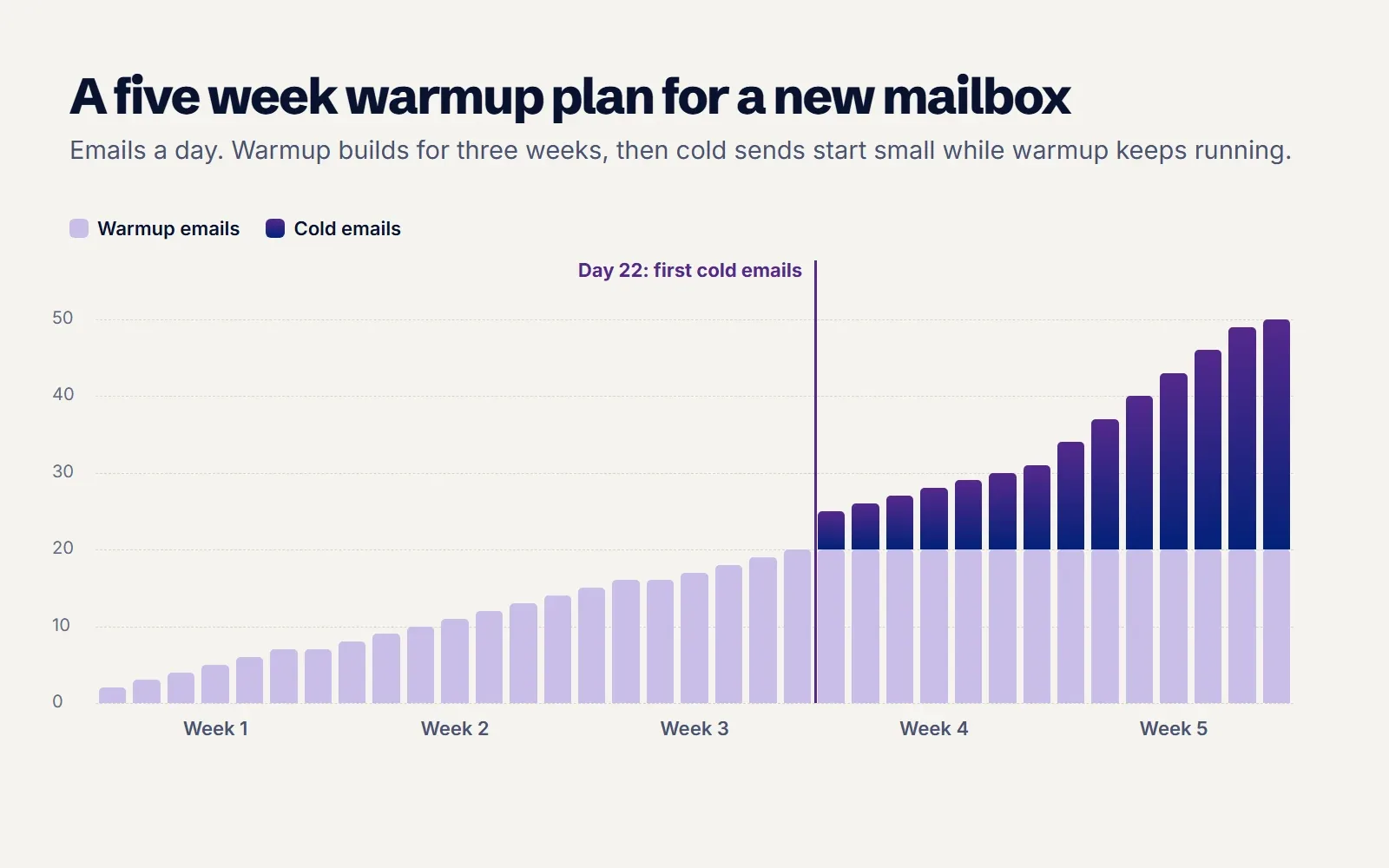
Cold email sits at the harder end of this range. The people you write to never signed up, so engagement is lower than for a newsletter, and providers take longer to decide your mail is wanted. Three weeks of warmup before the first cold email, followed by a slow ramp, is a sensible minimum. Domains older than a few months that have sent normal business email can usually move faster, but still benefit from a ramp.
What warmup actually does
Mailbox providers decide where an email lands partly on the sender's history. A domain registered last week has none, and as Microsoft puts it, providers view email from a new domain as suspicious until it builds a positive sending reputation. You cannot borrow that history either: Microsoft notes that reputation does not transfer from one domain to another.
Warmup builds that history before your cold campaign starts. A warmup tool sends a small, slowly rising number of normal looking emails between your mailbox and a pool of other real mailboxes. Those mailboxes open the emails, reply to them, and if one lands in spam, move it to the inbox and mark it as important. To a provider, your mailbox starts to look like what it is: a person who sends a reasonable amount of email that people want to read.
Does warmup work?
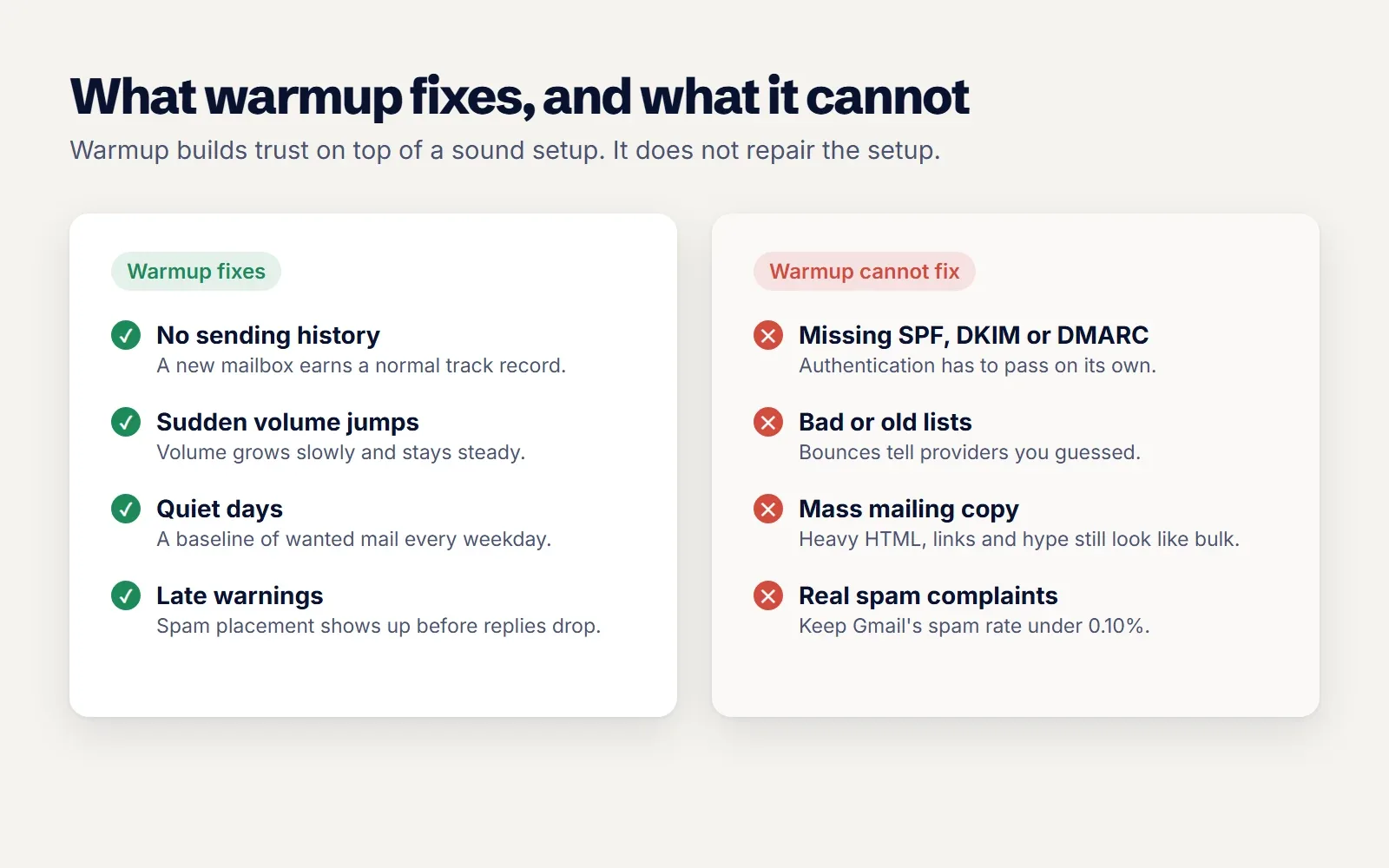
Yes, for what it is meant to do. Warmup is good at three things:
- Building a sending history for a new mailbox, so the first cold emails do not come from a sender with no record at all.
- Keeping a steady baseline of normal activity on quiet days, so your volume does not swing between nothing and hundreds.
- Early warning. When warmup emails start landing in spam, you know a mailbox is in trouble before a campaign tells you through falling replies.
It is not a cure for everything. Warmup cannot fix missing SPF, DKIM or DMARC records, a list full of invalid addresses, copy that looks like a mass mailing, or people marking your cold emails as spam. If those are wrong, warmup slows the damage at best. Google asks senders to keep the spam rate reported in Postmaster Tools below 0.10% and never reach 0.30%. No amount of warmup traffic makes up for real recipients pressing "Report spam".
So the honest answer: warmup works, as long as the rest of your setup is sound. Our guide on why cold emails go to spam covers the other checks providers run, and they all need to pass too.
Before day one: set the domain up properly
Warming up a badly configured domain wastes three weeks. Do this first:
- Use a separate domain for cold outreach, such as getyourbrand.com next to yourbrand.com, so a bad week never touches the email your customers and finance team rely on. Point the new domain's website at your main site.
- Publish SPF, DKIM and DMARC and check all three pass. Start DMARC at
p=noneso you can read reports before tightening it. - Set up each mailbox like a real person's: a real name, a profile photo and a short signature.
- Keep the first sends plain. No tracking pixels, no link shorteners, no heavy HTML.
A week by week warmup plan
Here is the plan we would use for a brand new mailbox on a new domain. Adjust the numbers to your provider's limits and your own results.
| Week | Warmup emails a day | Cold emails a day | What to check |
|---|---|---|---|
| 1 | 2, rising to about 8 | None | SPF, DKIM and DMARC pass; warmup emails reach the inbox |
| 2 | About 8 to 14 | None | Few or no warmup emails landing in spam |
| 3 | About 14 to 20 | None | Health holding steady; domain not on any blocklist |
| 4 | About 20 | 5 to 10, to your best fit leads | Bounces under 2%; replies arriving; placement test |
| 5 and after | About 20, never switched off | Add a few a day, up to 30 or so | Spam complaints, bounces and health every week |
Start cold sending with your best fit, freshly verified leads. Microsoft advises starting with the recipients most likely to engage and least likely to complain or bounce, and the same logic applies to cold email: your first sends should go to people with an obvious reason to care. Our guide on finding verified business email addresses covers how to keep that first list clean.
How to tell a mailbox is ready
Days on a calendar are a guide, not a guarantee. Look at the signals:
- Warmup placement. Nearly all warmup emails land in the inbox, not spam, across Gmail and Outlook.
- Authentication. SPF, DKIM and DMARC all pass on a test email, and the domain is not on a blocklist.
- Spam rate. If you send to Gmail users, Postmaster Tools shows a spam rate well under 0.10%.
- Early campaign numbers. The first small batch has low bounces and some replies.
If any of these slip, slow down. Lower the cold volume for a week and keep warmup running. It is much faster to recover a mailbox that dipped than one that was pushed until it broke.
Keep warmup running after the campaign starts
Warmup is not a one time step. Cold email naturally gets fewer replies and more deletions than normal mail, and a steady flow of positive engagement in the background balances that. It also keeps your volume consistent: Microsoft notes that consistent volume, frequency, complaint and bounce levels build reputation faster, and that sending less often than weekly slows it down.
When a mailbox's health drops, the right move is usually to pause cold sending from it, not warmup. Keep the warmup going, find the cause (a bad batch of leads, a new link in the copy, a spike in volume), fix it, and bring the mailbox back once its placement recovers.
How many mailboxes and domains do you need?
Work backwards from the volume you want. If each mailbox sends around 30 cold emails a day once warmed, and you want 300 a day, you need about ten mailboxes, spread across two or three domains so one problem does not take everything down. Ten mailboxes sending 30 each look far more natural than one sending 300, and if one slips, the others keep the campaign running.
Start the warmup for every mailbox at the same time, and add new mailboxes a few weeks before you need them rather than on the day volume goes up.
Before you buy ten domains, check whether you need the volume at all. Many teams find that a smaller list of well matched leads books as many meetings as a big one, with far less risk to their mailboxes. Our guide to getting more B2B sales meetings explains how to decide who is worth emailing first, which often turns a plan for 300 emails a day into a plan for 100 better ones. Fewer mailboxes also means fewer domains to monitor, fewer records to keep correct and less warmup to wait for when you grow.
How ZicReach handles warmup
AI Warmup is free on every plan, for every mailbox, and never uses credits. Your mailboxes trade real looking emails with a warmup pool; anything that lands in spam is moved to the inbox, marked read and answered. An AI writer drafts warmup emails about the things your business really emails about, or you can use your own.
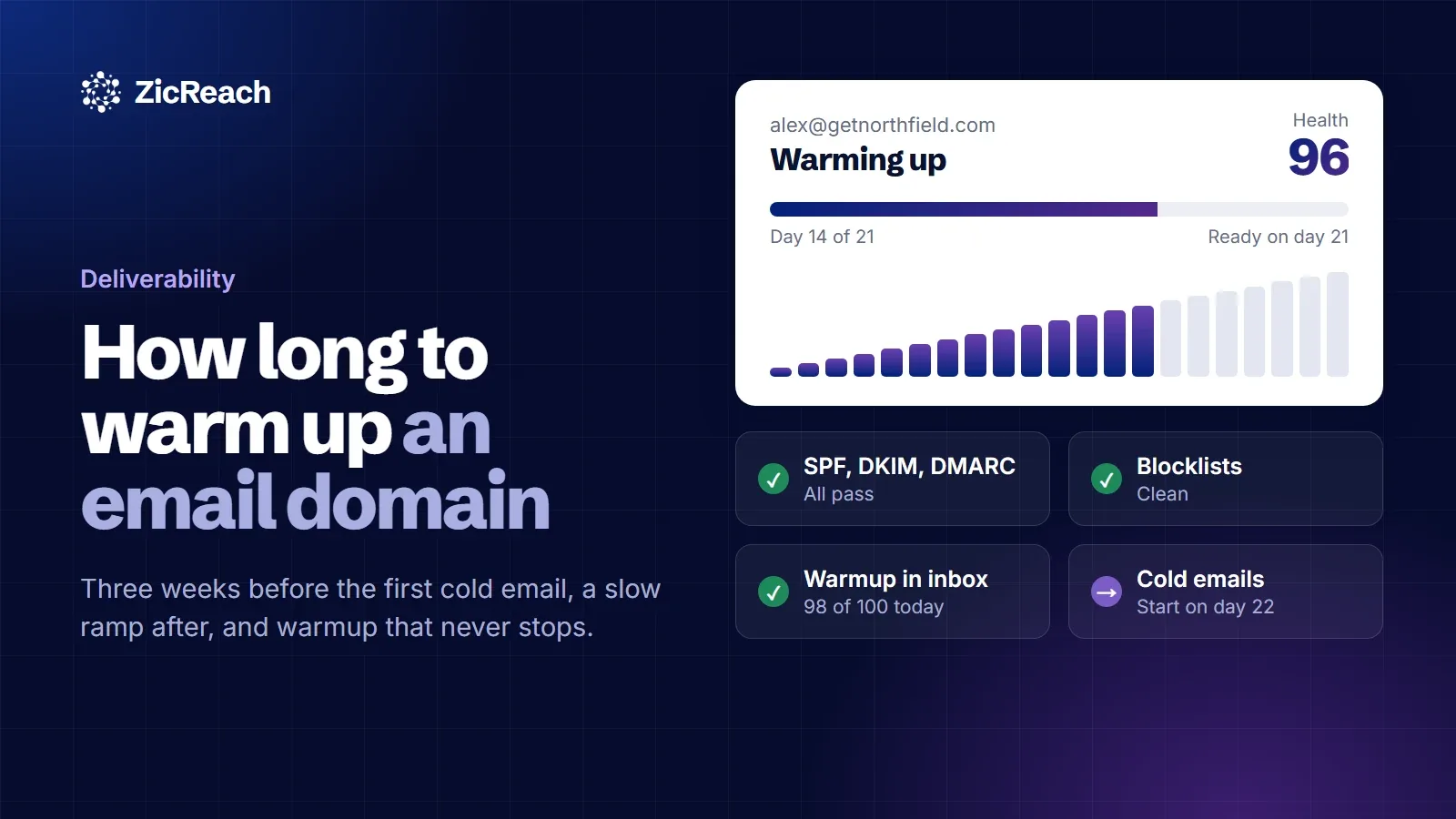
- Readiness you can see. Each mailbox shows Warming up from day 7, Almost warmed up from day 10 and Warmed up from day 21.
- A health score. Health starts at 100 and drops for warmup emails that land in spam over the last 14 days, plus a penalty when campaign bounces climb.
- Protection that acts on its own. When health falls below your limit (90 by default), campaigns stop sending from that mailbox while warmup keeps going, and sending resumes once it recovers.
- Domain checks. MX, SPF, DKIM, DMARC and blocklists for every sending domain, with the exact record to add when one is missing.
When the mailbox is ready, AI Email Marketing starts campaigns at 20 emails a day per mailbox by default and can ramp up a few at a time. If you are planning a team setup, the sales teams and agencies pages show how warmup runs across every rep's or every client's mailboxes.
Questions people ask
Can I skip warmup on an old domain?
If the domain has sent normal business email for months, it already has some history, so you can move faster. Still ramp up cold volume gradually; a sudden jump from a few emails a day to hundreds looks suspicious on any domain.
Is two weeks of warmup enough?
For a brand new domain, it is usually too short for cold email. Postmark says 3 to 6 weeks for full volume, and Microsoft says four to eight. Two weeks may be enough to start sending a handful of emails to your best leads, but not to scale.
How many warmup emails should I send a day?
Start with a few and rise to about 20 a day over the first three weeks. More is not better; warmup volume should look like a real person's normal email traffic.
Should warmup run forever?
Keep it running for as long as the mailbox sends cold email. It keeps a steady base of positive engagement and warns you early when placement slips.
How many cold emails can I send after warming up?
Start with 5 to 10 a day per mailbox and add a few each day, up to around 20 to 30. If you need more, add mailboxes rather than pushing one mailbox harder.
The short version
Give a new mailbox about three weeks of warmup before its first cold email, start with a small batch to your best leads, and grow slowly while warmup keeps running in the background. Warmup builds the history providers want to see, but it only works on top of correct authentication, clean lists and emails people want. Once the inbox is sorted, our guide on improving your cold email reply rate covers what to do next.
To warm your first mailbox tonight, start ZicReach for free and switch warmup on. The pricing page shows how many mailboxes each plan includes.
Put this into practice with ZicReach
Find leads, write the sequence and send from warmed inboxes in one place. Free to start, no card needed.
Start for free